
Emberwatch
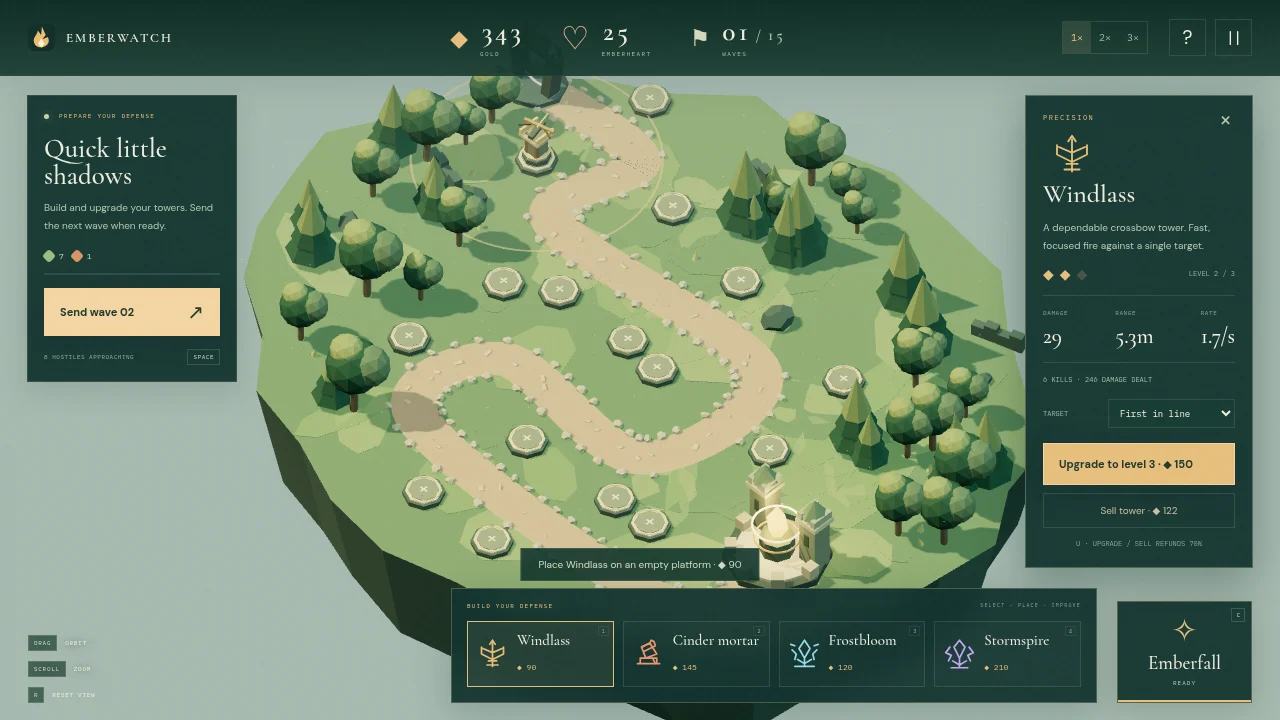
Ready to playBuild, upgrade, and unleash elemental magic in a 3D tower defense battle to protect the Emberheart.
A little about the game
Hold the light.
Emberwatch is a single-player tower defense game set in a miniature 3D fantasy world.
Combine crossbows, explosive mortars, slowing frost towers, and chain lightning to stop advancing enemies. Upgrade your defenses, choose targeting priorities, and cast Emberfall to turn the tide of
battle.
Defend two distinct landscapes across three difficulty levels. Survive 15 waves, face a boss every fifth wave, and make every gold coin count. Plan between attacks or keep building during combat.
Your towers. Your strategy. The Emberheart is counting on you.
How to play
Emberwatch lets you plan before sending the next wave. Stone pads mark where towers can go, and the range preview helps you judge how much of the enemy route a placement will cover.
Your first game
- Take your stand.
Choose a frontier and difficulty. Start with Verdant March and Wanderer to learn the tower controls before trying the other map or a tougher setting.
- Build before sending the wave.
Select a tower, then click a stone pad and review its cost and range. Precision, explosive, slowing and lightning towers fill different roles. Send the next wave when you are ready.
- Use the gold you earn.
Kills and completed waves earn gold for more towers and upgrades. Inspect a tower to change its target priority or upgrade it. Protect the Emberheart through fifteen waves, with a boss every fifth wave.
Controls
- 1 / 2 / 3 / 4
- Select a tower type, then choose a stone pad.
- Space / U
- Send the next wave / upgrade the selected tower.
- C, then click
- Target the Emberfall spell when it is ready.
- W / A / S / D
- Pan the camera.
- Q / E / R
- Rotate / reset the view.
- Esc / P
- Pause.
A useful starting pointCompare how long enemies stay inside a tower’s range at different pads. A placement beside a bend can cover more of their route than one that only touches a short straight.
Before you play
The opening defense checked in desktop Chrome with a mouse and keyboard. The camera can also be dragged and zoomed with the wheel. This is a solo game; a full fifteen-wave run was not part of the check.



From the community (0)
Be the first to start the conversation.